The AI front office for home service businesses
Calls in. Jobs out.
Receva answers every call — nights, weekends, while you're under a house — qualifies the homeowner, books the right technician into a real open slot, and follows up on the ones you missed. Unlimited calls. No per-minute or per-call charges.
Unlimited calls in and outH.O.M.E. qualificationGoogle, Outlook, Jobber and Housecall Pro sync
30-day free trial, or 60 call minutes — whichever runs out first. Lead fees waived throughout.
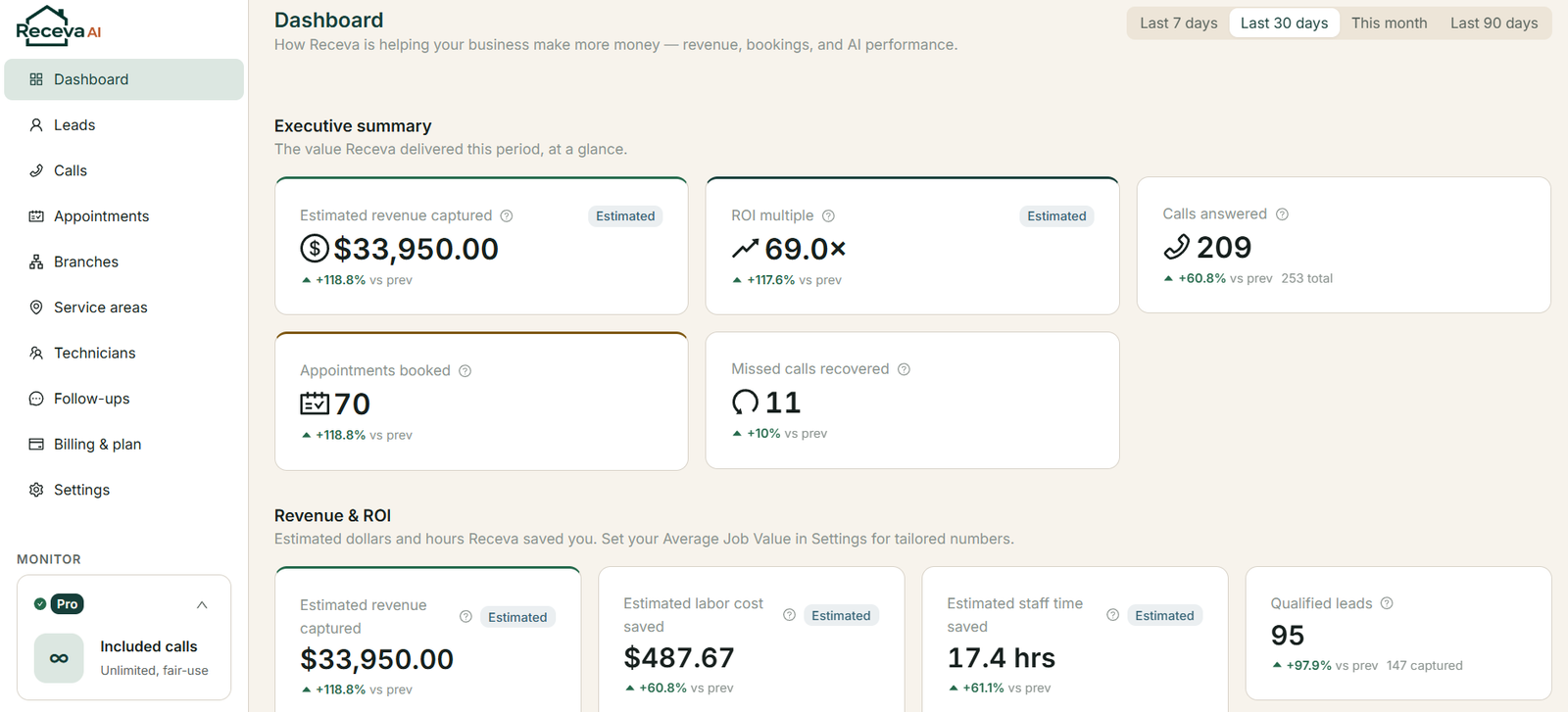
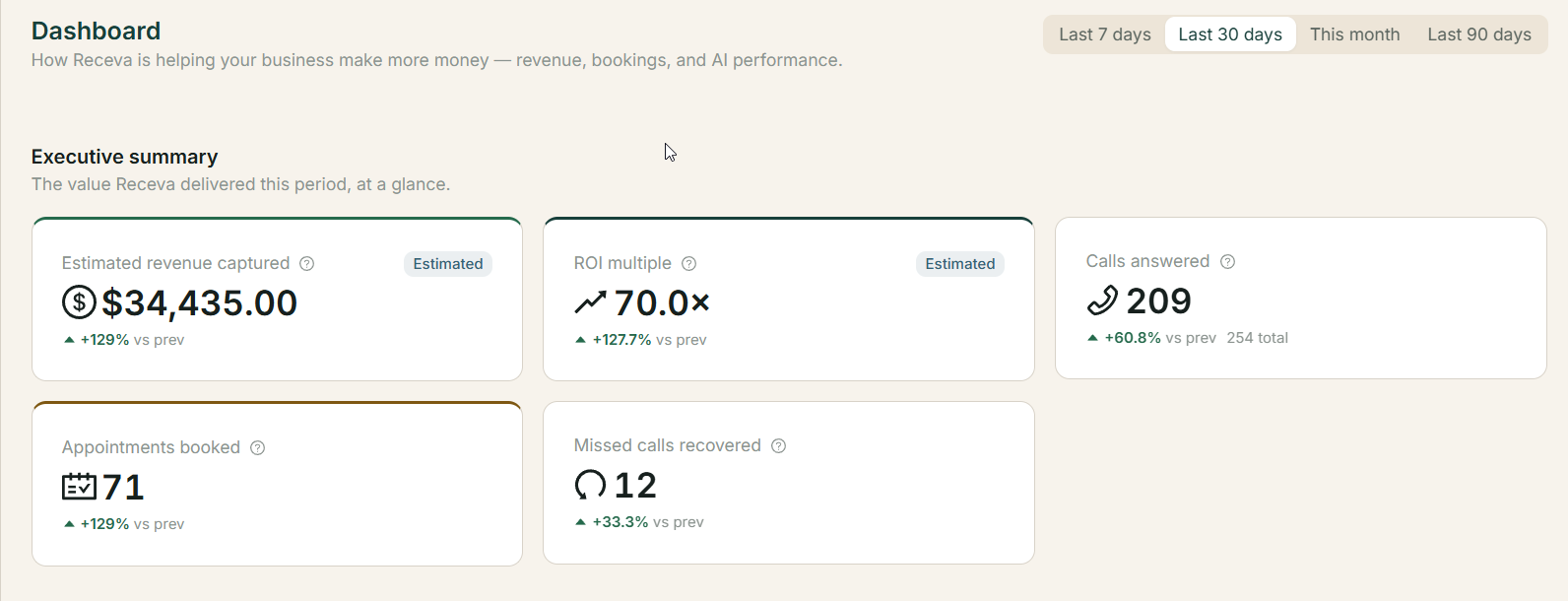
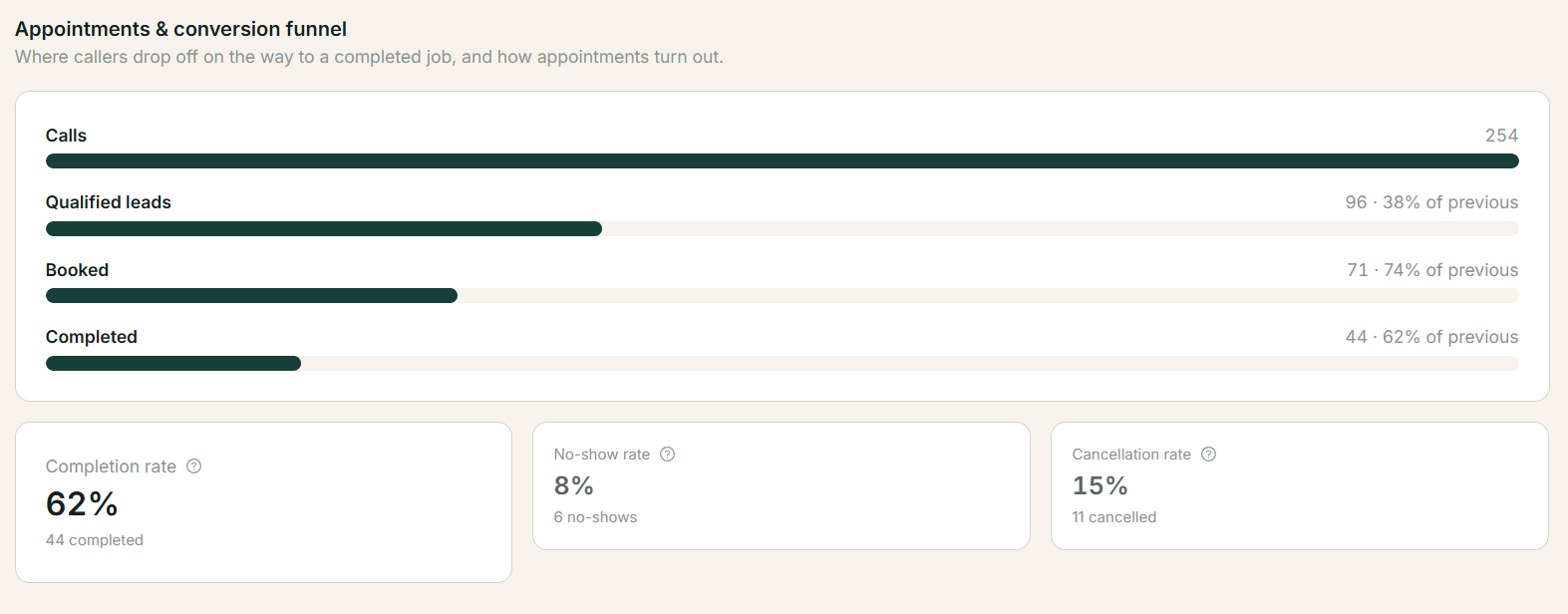
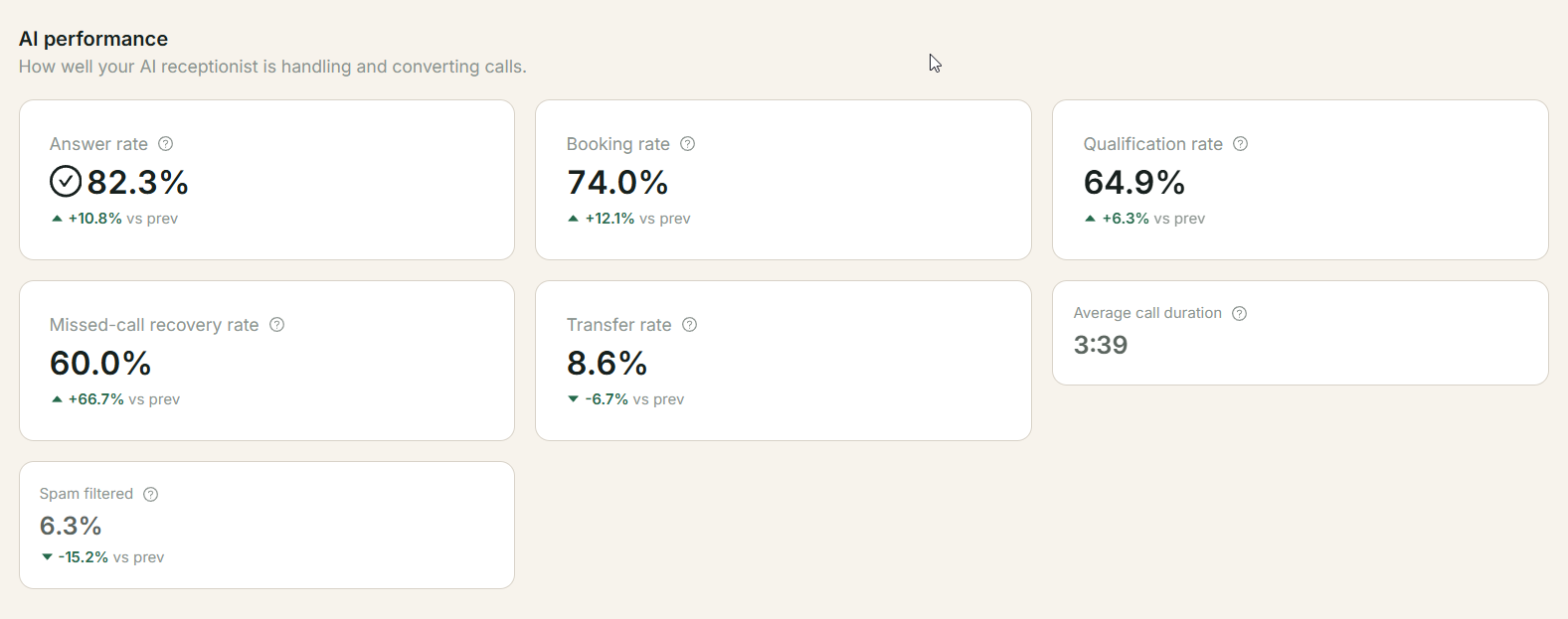
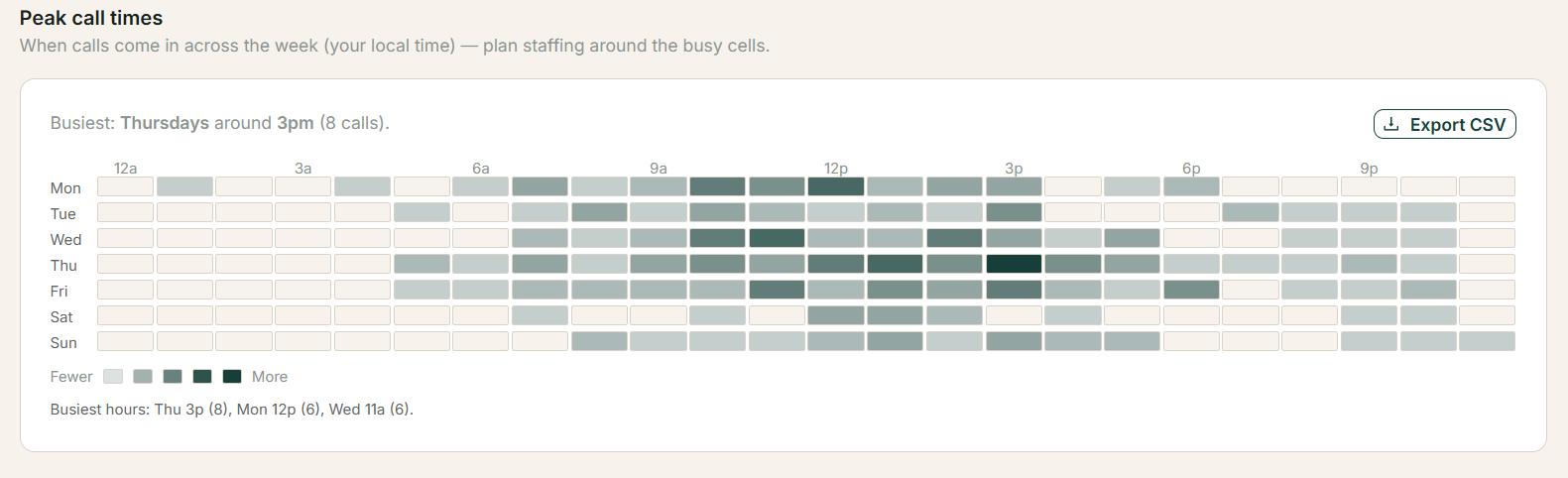
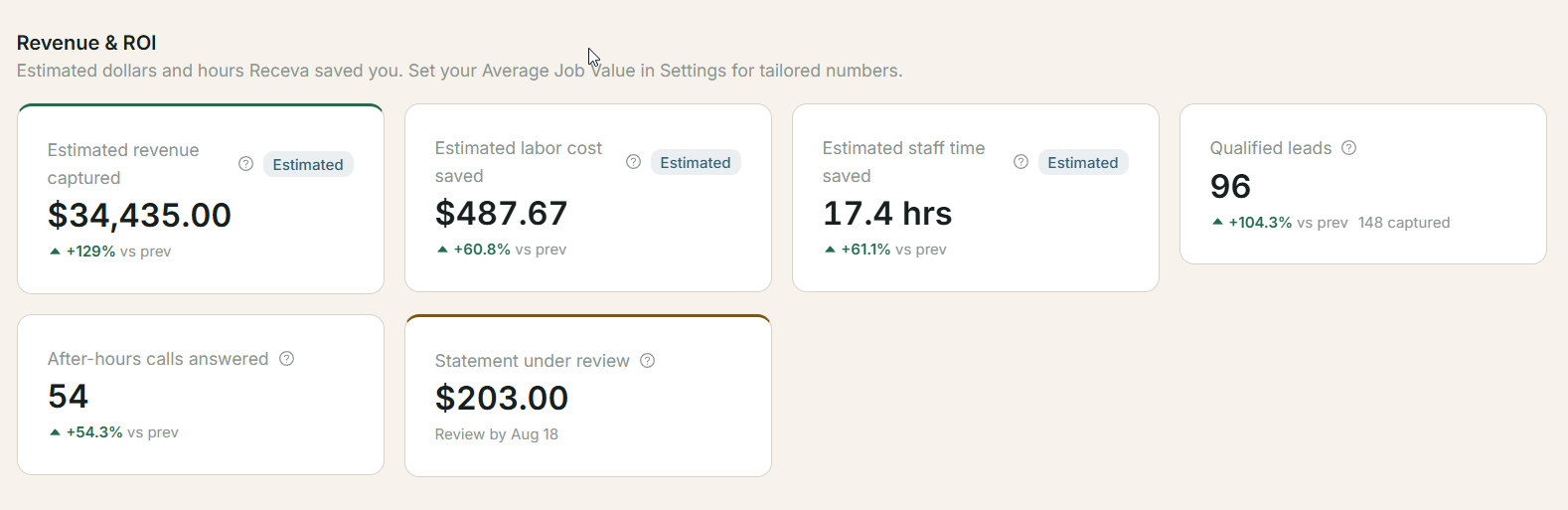
Your dashboard
Every call, measured
Answered, qualified, booked and followed up — one view of the whole front office.
Books and syncs with the tools you already run on
18 trades, each with its own service catalog — HVAC, plumbing, electrical, solar, roofing, construction, landscaping, pool & spa, pest control, cleaning, garage door, appliance repair, locksmith, handyman, painting, flooring and more.
Jobber and Housecall Pro sync is available on Pro and above. Calendar sync is on every plan.
The cost of a missed call
You're not missing calls because you're careless. You're missing them because you're doing the work.
A homeowner with a burst pipe calls three contractors and books the first one who picks up. Voicemail doesn't hold that job for you, and neither does an answering service that takes a name and a number and gets the address wrong. In a trade where one job can run five figures, the calls you can't take are the largest unmeasured line in the business.
Calls that go unanswered
Evenings, weekends, and every hour you're on a roof or under a house. The caller doesn't leave a message. They call the next number.
Leads that were never qualified
A message with no service area check, no urgency, and no idea whether the caller can authorise the work. Someone has to call back to find out.
Follow-ups that never happened
The estimate nobody chased. The missed call nobody returned. Work you already paid to generate, left on the table.
Put a number on it
Your assumptions, your numbers. Change anything below.
Estimated recoverable revenue per month
$8,925
From 52 missed calls a month, 18 of which would have booked at $850.
Estimated. Calculated from the figures you entered — missed calls × 4.33 weeks × booking rate × recovery rate × average job value. It is not a projection of your results, and it excludes the subscription and per-booked-job fee. The same calculation runs on real call data inside your dashboard.
See what it costsHow it works
A general answering AI takes a message. Receva runs a trade workflow.
It knows the difference between a no-heat call at 9pm and a quote request. It knows your service area, your service list, your technicians' hours, and which calls are emergencies.
-
The call is answered
Every call, 24/7, inbound and outbound. No cap, no per-minute charge, no voicemail.
-
H.O.M.E. qualification
A deterministic four-gate funnel, run on every call. Service area is a hard gate; the rest are captured and flagged.
-
Booking, or a transfer
Books a real open slot against your technicians' working hours and connected calendar. Warm or blind transfer to a person whenever the call needs one.
-
CRM and calendar stay in sync
Google Calendar and Outlook on every plan. Jobber and Housecall Pro on Pro and above. Availability is re-checked at the moment of booking.
-
Follow-up and recovery
Missed calls get chased automatically. Estimates get followed up. Included on every plan, not metered.
Books the jobs you can actually do.
The four H.O.M.E. gates every caller goes through, spelled out. Each answer is recorded with a timestamp and the reason behind it.
Home in your service area
Postal codes and drawn polygons, with branch overlap resolution. A hard gate — out-of-area callers are captured as leads, never booked into a job you can't service.
Owner or decision-making authority
Flagged, not disqualifying. A tenant calling about a landlord's boiler still gets help; the office sees who was on the phone.
Maintenance or service need identified
Matched against your own service catalog, not a generic list. The agent speaks your services.
Emergency and urgency captured
On every call. Emergencies bypass the working-hours mask and escalate. Receva is not emergency dispatch — it routes urgency to you, fast.
See a real call
Four calls, including the two nobody demos
A booking, a transfer, an emergency, and a caller Receva refused to book. Watch the conversation play out turn by turn.
Answered · 3:02 · Tuesday 9:14pm
BookedTranscripts are shown with the caller's consent and the customer's permission. Names and addresses are replaced with the standard demo fixture.
H.O.M.E. result
Outcome
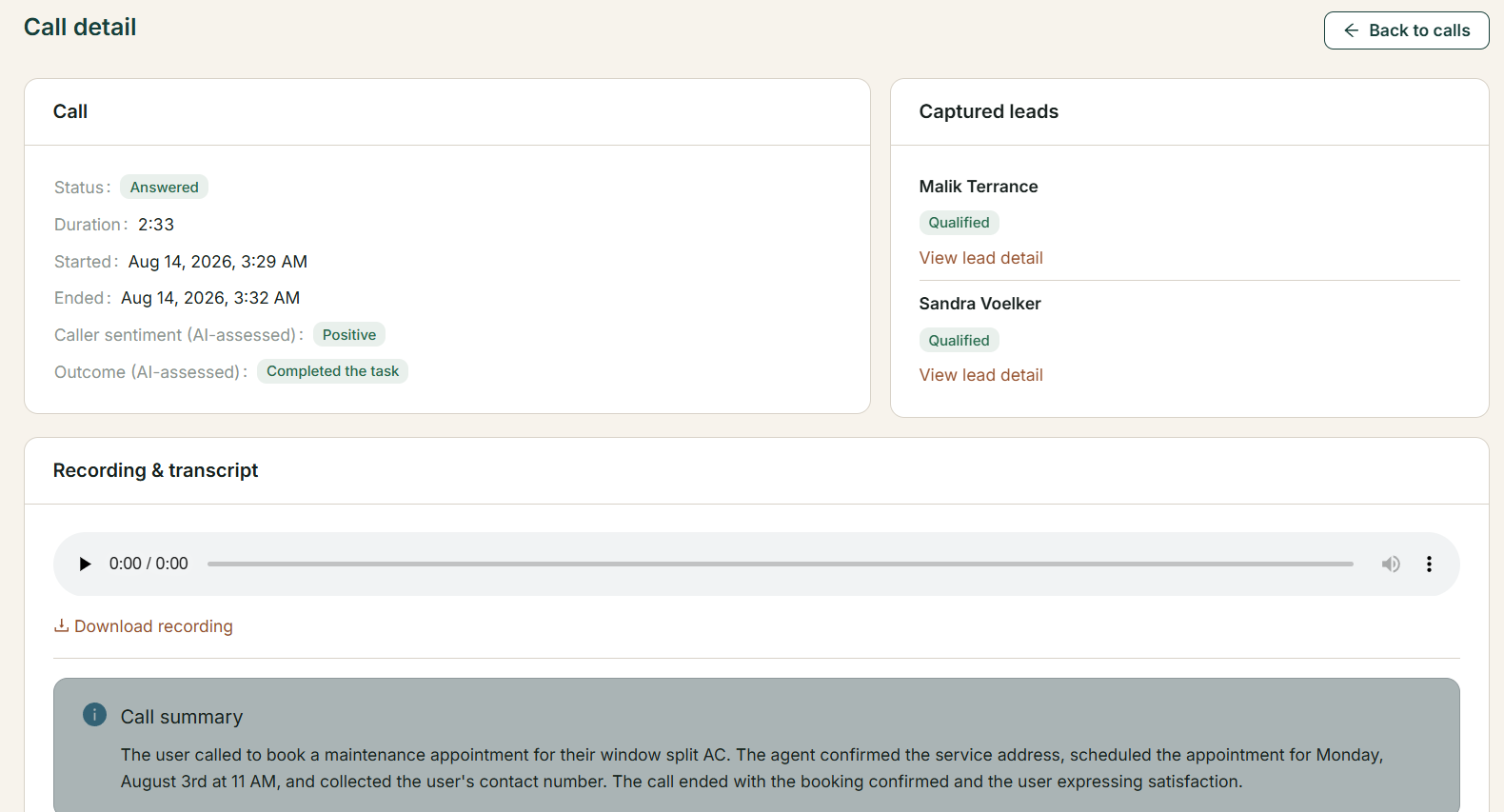
Nothing happens on a call that you can't read back
Status, duration, sentiment, outcome, the captured lead and its qualification state — recorded against every call, with the reasoning and the timestamp. Summaries and confidence scores are assessments made by the AI, and they're labelled as assessments, never as confirmed fact.
Unlimited, in both directions
Your busiest month costs the same as your slowest.
Every call answered. Every missed call chased. No per-minute charges, no per-call charges.
Inbound is uncapped
24/7, including after hours, weekends and holidays. A storm week doesn't come with a bill for it.
Outbound is included, not metered
Missed-call recovery calls the caller back automatically. It is part of the product on every plan, not a separate add-on with its own meter.
What you get
Four jobs, done properly
Answer every call
- Unlimited inbound and outbound calls
- Warm and blind transfer
- Emergency handling and escalation
- Missed-call recovery
- Spam call filtering
No opportunity goes to voicemail
Book qualified work
- H.O.M.E. qualification on every call
- Google Calendar and Outlook sync
- Per-technician working hours
The right customer in the right slot
Grow booked revenue
- AI Sales Assistant, from Pro
- Automated follow-ups
- Revenue, ROI and conversion analytics
- Peak call time and answer rate reporting
More value from every conversation
Scale operations
- Jobber and Housecall Pro sync, from Pro
- Multi-location routing, on Growth
- Service-area polygons and overlap rules
- Branch-level analytics
Consistency as you grow
Per-technician working hours and CRM sync are Pro and above. Multi-location routing and advanced dispatch are Growth. Card deposits are a $49/mo add-on, available on any plan.
Some repair calls should be replacement conversations.
When the criteria are met, Receva makes that case — and shows you exactly why it did. Think of it as the conversation your best salesperson would have had, on the calls you weren't there for.
Criteria, not instinct
Age of the system, repair history, the cost of the repair against replacement. The assistant only makes the case when the defined criteria are met.
You control the switch
One toggle in Settings, off by default. You decide when and whether it runs.
Every recommendation is recorded with its reasoning
What was pitched, on what basis, and how the homeowner responded. The honesty of the criteria is the point — nobody is pressured into anything.
Included from Pro Never an add-on.
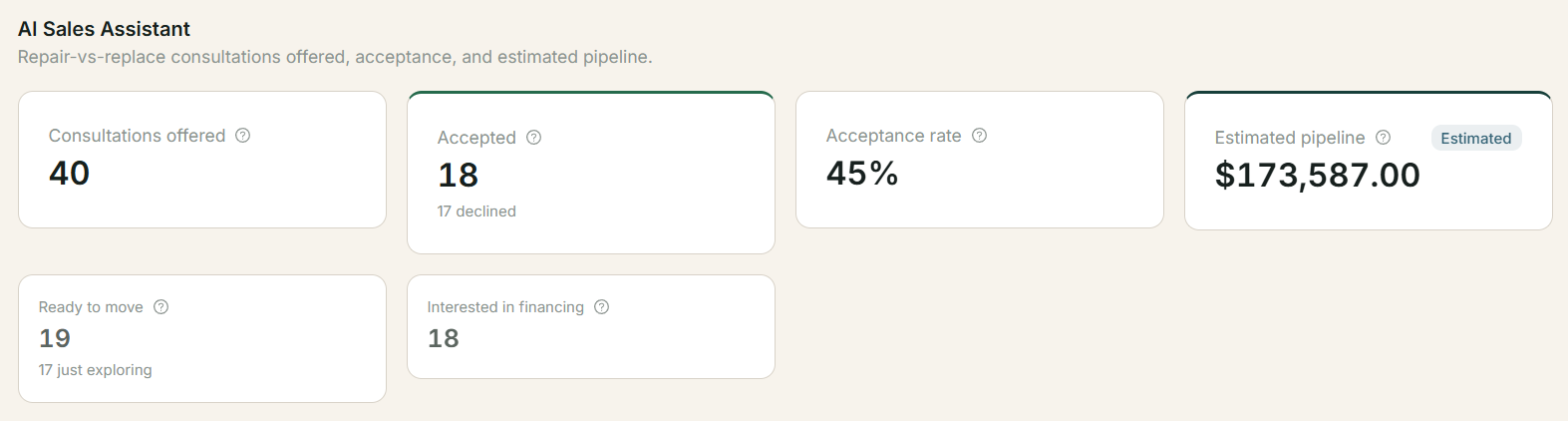
Control and visibility
Written for whoever has to clean up after it
If you run the office, your question isn't whether the AI is clever. It's what happens when it's wrong, and how much of your day it takes back. Here is the exception path, not just the success path.
Human takeover, mid-call
Warm or blind transfer on every plan. If a caller asks for a person, they get one.
Exceptions come to you, cleanly
Out-of-area callers, unclear needs, failed bookings and disconnected integrations surface as items to handle — not as silent failures.
A full audit trail
Recording, transcript, qualification result, reason and timestamp on every AI decision. You can always see why something happened.
It won't double-book
Availability comes from the connected calendar or FSM, with a live re-check at the moment of booking.
Built for your trade
18 trades, each with its own service catalog
The agent works from the same catalog the product uses, so it speaks your services and your emergencies — not a generic script with your trade's name dropped into it.
Pricing
You only pay when we book you real work — and the fee drops at every tier
A subscription, plus one flat fee per booked job — the same whether the call was an emergency or a filter change. The more you grow, the less each booking costs. Prices are on this page because you shouldn't have to sit through a call to learn them.
Starter
One location, one or a few technicians.
$199/mo
Per booked job
- Any booked job
- $10
- Unlimited calls in and out
- H.O.M.E. qualification
- Missed-call recovery
- Warm and blind transfer
- Google Calendar and Outlook sync
Pro
Most chosenA growing team that wants more from every call.
$349/mo
Per booked job
- Any booked job
- $8
- Everything in Starter
- AI Sales Assistant included
- Jobber and Housecall Pro sync
- Per-technician working hours
- Full revenue, ROI and conversion analytics
Growth
Multiple locations and branch routing.
from $599/mo
Per booked job
- Any booked job
- $6
- Everything in Pro
- Unlimited locations, with branch routing and advanced dispatch
- Service-area overlap resolution across branches
- Branch-level analytics
- Onboarding support
Cancel anytime, yourself. No cancellation form, no retention call, no notice period — cancelling takes effect at the end of the month you have already paid for, so nothing is cut off mid-month. Subscriptions are billed monthly in advance and are not refundable; per-booked-job fees never need a refund, because every line is held for you to review before the statement is charged. Cancellation and refund policy
Payments are processed by Stripe. You enter your card on Stripe's own checkout, so card numbers never reach us, and you manage your card and invoices in Stripe's billing portal. Charges appear on your statement as RECEVA AI. Prices exclude tax.
Payments and deposits $49/mo add-on
Take a card deposit during the call, with no percentage taken on your deposits. Available on any plan.
WhatsApp and web chat Coming soon
The same qualification and booking flow on text channels. Planned for a future release.
Free trial — 30 days or 60 call minutes
Whichever runs out first. Lead fees are waived throughout.
Trust, and the hard parts
The questions a salesperson would have answered, answered here instead
We don't gate the product behind a demo, so everything a demo would have covered is written down. Including the parts that don't flatter us.
Calls are recorded, and disclosed
Callers are told. Recordings and transcripts are visible to your account only. Security
What "unlimited" means
No per-minute or per-call charges, inbound or outbound, on any plan. Full terms
How a booked job is defined
Published in full, with the exclusions and the duplicate policy, so you can check any line on your statement. The definition
If we bill you for a bad lead
Raise the line from the statement inside your dashboard. There's a real dispute workflow and a stated window; disputed lines are held while we review.
What Receva will not do
It is not emergency dispatch. It doesn't diagnose. It doesn't quote a job it can't price. And it will not pretend to be a person if asked.
What we don't integrate with
No ServiceTitan and no HubSpot in V1. Jobber and Housecall Pro are the FSM integrations that exist, and we'd rather say so than let you find out later.
Your customers' data
Retention, export and deletion controls, GDPR-grade. If you cancel, you can take your data with you. Privacy
Support and onboarding
Guided five-step setup in the product, and a person to talk to when the page didn't answer it. Technicians never need to sign in — there is no technician app, by design.
Questions
Everything a demo call would have covered
Grouped by what actually blocks a decision. Answers first, detail after.
Money
What does Receva cost?
$199/mo for Starter, $349/mo for Pro, from $599/mo for Growth — plus one flat fee for each job we book you: $10, $8 or $6 by tier. There is no per-minute charge and no per-call charge on any plan.
One add-on is available: payments and deposits, at $49/mo on any plan, and we take no percentage of what you collect. WhatsApp and web chat is coming soon. Nothing live today is metered beyond the subscription and per-booked-job fee.
What is the per-booked-job fee, exactly?
It is a flat fee charged once per job we book into your calendar — $10 on Starter, $8 on Pro, $6 on Growth. Urgency does not change it: an emergency costs the same as a routine repair. It is charged on booked work, not on calls answered.
Calls that don't result in a booking cost nothing. Fees appear as individual lines on a weekly statement in your dashboard, each one traceable to the call that produced it.
What counts as a booked job — and what doesn't?
A call is billable when Receva books a real appointment, in your service area, for a service on your catalog, with a contactable homeowner, into a slot that exists on your calendar. All five conditions have to hold.
Not billable: out-of-area callers, spam and robocalls, wrong numbers, existing-customer service queries, callers asking for someone in the office, calls that never produced an appointment, appointments that never made it onto your calendar, bookings that were cancelled, and duplicates of a job already billed. The full definition, with every exclusion, is published on its own page.
What if you bill me for a bad job?
Raise it from the statement in your dashboard and we hold the line while we review it. Every billed job links to its call recording, transcript and qualification result, so a dispute is a matter of checking the record rather than arguing about it. Disputes are raised within the stated window on each statement.
If we got it wrong, the line is removed. We would rather lose the fee than have you distrust the statement.
Duplicate callers — am I billed twice?
No. If the same homeowner calls back about the same job, it is one booked job, not two. Repeat contact about an existing booking is never billable, and a rescheduled appointment is not a new job.
A genuinely new job from the same homeowner later on is a new job. There is no time window to track — a job is billed once, ever, and the full rule is published in the booked-job definition.
Is unlimited really unlimited?
Yes — no per-minute charges and no per-call charges, on calls in and calls out, on any plan. Full terms
Can I change or cancel plans?
Yes, from Billing in your dashboard, at any time. Upgrades take effect immediately and are prorated. Downgrades take effect at the end of the current period, so you keep what you are paying for until it ends.
On downgrade, entitlements above your new tier stop — the AI Sales Assistant and CRM sync below Pro, multiple locations below Growth. Your data, calls and history remain.
What's in the free trial?
30 days or 60 call minutes, whichever runs out first. Lead fees are waived for the whole trial, so anything we book you during it is free. It is a full-product trial, not a limited demo.
When it ends, you pick a plan to keep going. Nothing is deleted if you don't — your calls, leads and settings are there when you come back.
What do the add-ons cost?
Payments and deposits is $49/mo, on any plan. It lets Receva take a card deposit during the call, paid straight into your own Stripe account — we take no percentage of it, though Stripe's own processing fees still apply. You decide whether a deposit is required and set the flat amount.
WhatsApp and web chat is coming soon and is not part of the Service today.
We'll publish WhatsApp and web chat pricing here once it launches.
Do you offer refunds?
No — subscriptions are billed in advance and are not refundable. What you get instead is that cancelling never cuts you off early: you keep full access until the end of the period you have already paid for.
Per-booked-job fees are built so a refund is never needed. Every line is held for review before the statement is charged, so a line you successfully dispute is removed rather than refunded — you are not charged for it in the first place. One statement is still open when you cancel; it closes, gets its review window, and charges for leads booked before you left.
What happens if my card fails?
Your calls keep being answered. Cards expire and banks decline; that is not a reason to switch off the phone line your business runs on. Stripe retries the charge automatically over the following days and we email you to update your card, which you do yourself in the billing portal.
Only an unpaid balance that survives the whole retry period puts the account at risk of suspension, and we tell you before that happens. A failed card on its own never does.
What will the charge look like on my statement?
RECEVA AI — not the legal entity name, so you are not left googling a company you have never heard of. Receva AI is a product of VarienTech LLC, and your contract is with us; Stripe is the payment processor, not the seller.
If a charge ever looks wrong, email us before raising it with your bank. We can trace any line back to the call that produced it in minutes, where a bank dispute takes weeks and can freeze the account while it runs.
Getting started
How long until it's answering calls?
Setup is five steps in the product — business profile, branch, technician, service area, phone number — and most owners get through it in one sitting. Once the number is provisioned, the agent answers immediately.
You can start with one technician and one service area and add the rest later. Nothing has to be complete before the phone starts being answered.
Do I get a new phone number, or can I use mine?
Either. Receva provisions a number you can forward to, or you can point your existing business number at it. Most businesses forward after hours first, then move to full-time once they have read a week of transcripts.
Forwarding rules are yours to set — all calls, after hours only, or overflow when nobody picks up.
What do I have to set up myself?
Five things: your business details, at least one branch, at least one technician with working hours, a service area, and a phone number. If you want calendar or CRM sync, connecting it is a one-click authorisation.
Your service catalog comes pre-loaded from your trade, so you are editing a list rather than writing one.
What if I only have one technician?
That is exactly what Starter is for. One technician, one service area, unlimited calls — the agent books against that technician's real working hours and calendar, so it never books you into a job you are already on.
Nothing about the product assumes a dispatch office. Plenty of accounts are one person and a van.
How it actually works
What happens on a call?
Receva answers, then runs the H.O.M.E. gates: H — is the home in your service area; O — are we speaking to the owner or someone who can decide; M — what is the actual maintenance or service need; E — is this an emergency. Then it books, transfers, or captures the lead.
Every gate result is recorded with its reasoning and a timestamp, so you can read back exactly how a call was judged.
What if the caller is outside my service area?
They are captured as a lead but never booked. Service area is the one hard gate — Receva checks the address against your postal codes and drawn polygons before it offers any slot, so it cannot promise a visit you can't make.
You are not billed for an out-of-area lead. The detail is still saved, so if you expand later you know who called.
Can it transfer to a real person?
Yes, on every plan, warm or blind. Warm transfer briefs whoever picks up on what the caller needs so nothing gets repeated. If a caller asks for a person, they get a person.
You set who calls transfer to and when. Outside those hours the call is qualified and booked or escalated instead.
What happens with emergencies?
Urgency is captured on every call, and calls flagged as emergencies bypass your working-hours mask and escalate to whoever is on call. To be clear about what this is not: Receva is not emergency dispatch and it will not promise an arrival time it cannot keep.
It gives immediate practical guidance where that is safe — for example, where the water shut-off is — then hands the call to a human.
What happens after hours?
Calls are answered, qualified, and either booked into the next real slot or escalated if they are emergencies. The caller gets a decision that night rather than a voicemail beep.
Emergencies are the exception that bypasses your hours. Everything else books inside them.
Will it double-book my technicians?
No. Availability comes from the connected calendar or field service management system, filtered by each technician's working hours, and it is re-checked at the moment of booking. A booking is a booking, not a request that someone confirms later.
If a slot disappears between the offer and the confirmation, the agent offers the next one rather than writing the conflict.
Does it call people back?
Yes — missed-call recovery is included on every plan. If a call comes in that isn't answered, Receva calls back automatically, qualifies the caller and books them if it can.
Outbound is not metered. It is part of the product, not an add-on with its own per-minute rate.
Does it sound like a robot?
Listen to the sample calls on this page and judge for yourself — that is a more honest answer than any adjective we could use. It does not claim to be human, and if a caller asks whether they are speaking to a person, it tells them the truth.
Callers are told the call is recorded, as required.
What if it gets something wrong?
Take over. Every call has a recording, a transcript, the qualification result and the reason behind each decision, so you can see what happened and fix it. Exceptions surface as items to handle rather than failing silently.
We do not claim it is never wrong. We claim you can always see what it did, and change it.
The AI Sales Assistant
What does the AI Sales Assistant do?
On calls where a repair meets defined criteria — system age, repair history, repair cost against replacement — it makes the case for replacement instead of booking another repair, and records what it said and why. It is the conversation your best salesperson would have had, on the calls you weren't there for.
The homeowner's response is recorded too: accepted, declined, ready to move, interested in financing. Your dashboard shows the pipeline it created.
Will it pressure my customers?
No. It only raises replacement when your criteria are met, it makes the case once, and it records the reasoning so you can audit any conversation. If the homeowner says no, the repair is booked as normal.
The honesty of the criteria is the point. An assistant that pitched everyone would cost you the trust you have spent years building.
Can I turn it off?
Yes. It is a single switch in Settings and it is off by default — you turn it on when you decide you want it, and off again whenever you like.
Turning it off does not affect qualification, booking or follow-up.
Which plans include it?
Pro and Growth, included in the subscription. It is not an add-on and there is no separate charge for it.
Starter accounts that want it upgrade to Pro; the change takes effect immediately.
Integrations
Which calendars does it work with?
Google Calendar and Microsoft Outlook, on every plan. Receva reads availability from them and writes confirmed bookings back, so whatever your team already looks at stays correct.
Connecting is a one-click authorisation from Settings, and it can be revoked the same way.
Which CRMs and field service systems?
Jobber and Housecall Pro, on Pro and above. Those are the two that exist today. We do not integrate with ServiceTitan or HubSpot, and we would rather tell you that here than have you discover it after signing up.
Bookings, customers and job details sync both ways so your system of record stays the system of record.
What if I don't use a CRM?
Receva works standalone. Leads, calls, appointments and follow-ups all live in your dashboard with an internal calendar behind the booking, so you can run the whole front office from it without connecting anything.
If you add a CRM later, connecting it does not require redoing your setup.
What if an integration disconnects?
You get an alert, and bookings keep working on the internal calendar in the meantime, so calls are never turned away because a token expired. Integration health is monitored continuously and reconnecting is one click.
Anything booked while an integration was down syncs when it comes back.
Multi-location
How does routing work across branches?
Each branch has its own service area — postal codes or drawn polygons — its own technicians and its own calendar. Receva matches the caller's address to the right branch, resolves overlaps by your rules, and books into that branch's availability. This is a Growth capability.
Where areas overlap, you decide the precedence: nearest branch, named priority, or capacity.
Can I see performance by location?
Yes. Calls, bookings, answer rates, recovered calls and estimated revenue are all reported per branch as well as across the portfolio, so you can see which location is converting and which needs attention.
Branch-level analytics are on Growth.
Trust
Are calls recorded? Who can hear them?
Yes, and callers are told at the start of the call. Recordings and transcripts are visible only to users in your account, and you can download or delete them.
Recording behaviour and retention are configurable to meet the disclosure rules where you operate.
What happens to my customers' data?
It is yours. You can export it or delete it at any time, retention is configurable, and we do not sell it or use it to market to your customers. Our data handling meets GDPR-grade requirements, including deletion on request.
Full detail is on the privacy and security pages, written to be read rather than to be survived.
What if I cancel — do I keep my data?
Yes. Export your calls, leads, appointments and statements before or after you cancel, and request deletion whenever you want. Cancelling does not wipe your history on the way out.
If you come back, your setup is still there.
Start answering the calls you're missing.
30 days or 60 call minutes, whichever runs out first. Lead fees waived throughout. Email and password to start — the business profile is collected inside the product, where it belongs.