
Product
The AI Sales Assistant: how a repair call becomes a replacement conversation
On calls where your own criteria are met — system age, repair history, the cost of the repair against replacement — Receva makes the case for replacement instead of booking another repair, and shows you exactly why it did. It's the conversation your best salesperson would have had, on the calls you weren't there for.
Included from Pro Off by default — you decide when it runs.
How it works
Three things happen, in order, on the same call
-
The criteria are checked against the job
System age, repair history, and the cost of this repair against the cost of replacement. All three come from what's already on the call — nothing extra is asked of the homeowner to make the assessment.
-
If they're met, the case is made once
Not a script, and not repeated if the answer is no. The assistant lays out why replacement makes sense for this specific system, in the same call, right after the repair itself is booked.
-
The outcome and reasoning are recorded
What was said, on what basis, and how the homeowner responded — accepted, declined, ready to move, or interested in financing. Your dashboard shows the pipeline it created.
Why criteria, not instinct
An assistant that pitched every caller would cost you the trust you've spent years building. This one only raises replacement when the numbers actually support it — which is also what makes a homeowner willing to hear it out.
Hear it on a call
A repair call where the criteria are met
Watch the full exchange play out below — nothing is skipped, and nothing is dramatized beyond what the criteria actually produce.
Thanks for calling — what's going on with the system today?
Our AC keeps tripping the breaker. This is the third time a tech's been out this year.
I can get someone out for that. Can I get the address, and roughly how old the unit is, if you know it?
1420 Fremont. It's original to the house — so, about fourteen years old.
That's helpful, thanks. I have a diagnostic slot with Dale tomorrow at 9am, or Priya at 1pm — which works?
9am is fine.
Booked — Dale, tomorrow 9am, at 1420 Fremont. One more thing before I let you go: with a unit that age and a third repair this year, it's worth weighing repair against replacement before Dale arrives — a new system comes with a full warranty instead of another repair on an aging unit. I'm not changing anything about tomorrow — Dale is still coming to repair it — I just don't think that's a decision to make without options in front of you.
Oh — okay, that's actually useful. Can he bring pricing on both, just in case?
Yes, I'll have him bring a repair quote and a replacement quote to the visit. If you'd like financing information on the replacement side ahead of time, I can send that over too.
Yeah, send that over.
Done — you'll get it by text today. See you tomorrow at 9.
Answered · 4:41 · Wednesday 10:20am
Replacement offeredCriteria checked
Outcome
The repair was booked exactly as asked. The replacement case was made once, with the reasoning above, and the homeowner asked for financing information. Recorded as "interested in financing" — Dale brings both a repair and a replacement quote to the visit.
Control and visibility
Written for whoever has to stand behind the call
Criteria, not instinct
Age of the system, repair history, the cost of the repair against replacement. The assistant only makes the case when the defined criteria are met.
You control the switch
One toggle in Settings, off by default. You decide when and whether it runs, and can turn it off at any time without affecting qualification, booking or follow-up.
Every recommendation is recorded with its reasoning
What was pitched, on what basis, and how the homeowner responded. The honesty of the criteria is the point — nobody is pressured into anything.
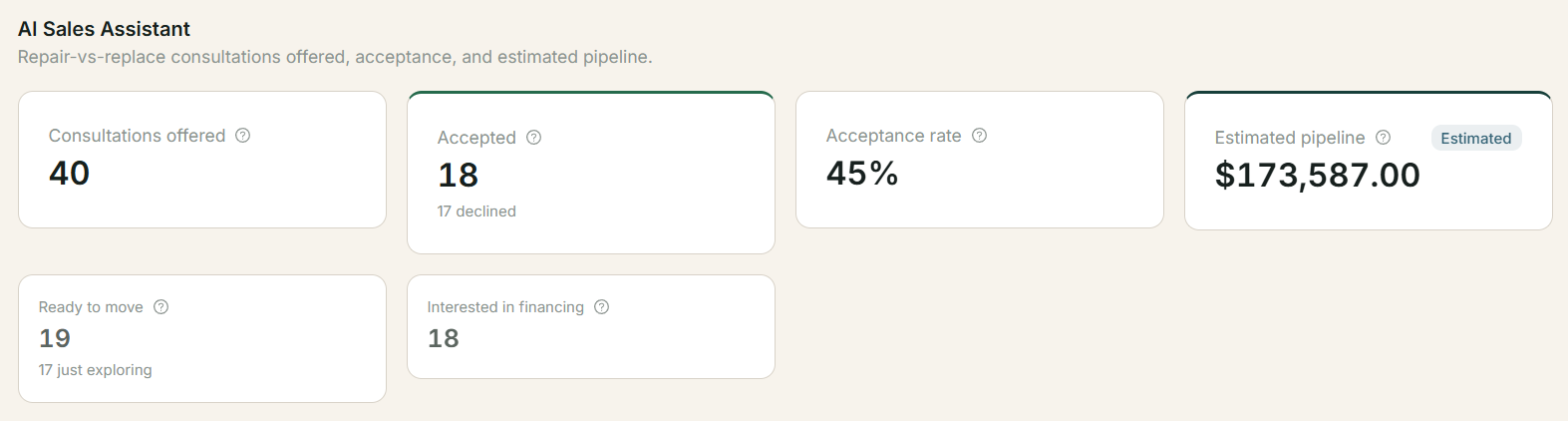
AI Sales Assistant
40 consultations offered
Every call where your criteria were met, and the case the assistant made on it.
A pipeline you didn't have to build yourself
Every consultation the assistant offers lands in your dashboard — accepted, declined, ready to move, or interested in financing — with the reasoning behind it, so following up is a matter of working a list rather than remembering which calls it was on.
Questions
The AI Sales Assistant, answered directly
What does the AI Sales Assistant do?
On calls where a repair meets defined criteria — system age, repair history, repair cost against replacement — it makes the case for replacement instead of booking another repair, and records what it said and why. It is the conversation your best salesperson would have had, on the calls you weren't there for.
The homeowner's response is recorded too: accepted, declined, ready to move, interested in financing. Your dashboard shows the pipeline it created.
Will it pressure my customers?
No. It only raises replacement when your criteria are met, it makes the case once, and it records the reasoning so you can audit any conversation. If the homeowner says no, the repair is booked as normal.
The honesty of the criteria is the point. An assistant that pitched everyone would cost you the trust you have spent years building.
Can I turn it off?
Yes. It is a single switch in Settings and it is off by default — you turn it on when you decide you want it, and off again whenever you like.
Turning it off does not affect qualification, booking or follow-up.
Which plans include it?
Pro and Growth, included in the subscription at no separate charge.
Starter accounts that want it upgrade to Pro; the change takes effect immediately.
Some calls are worth more than a repair.
Pro and Growth include the AI Sales Assistant in the subscription, at no separate charge. 30 days or 60 call minutes free, whichever runs out first.